Your software is built from strangers' code. We keep the malware out.
A firewall in front of every npm, PyPI, Go and NuGet install on your laptops, CI runners and servers, including the installs AI coding agents run. It stops malicious packages before they run.
No card needed · from $20 per developer a month
axios 1.14.1Hijacked release: remote-access trojan. Upgrade to 1.20.0.
- Today 10:04
-
npm install axios@1.14.1 -
npm error code E403
npm error 403 403 Forbidden - GET …/axios-1.14.1.tgz - BLOCK
-
uh. did I just almost install malware? 😅Delivered
-
Security lead
🧑💼Yep. That release was hijacked. It drops a remote-access trojan, and it never reached your laptop.
-
Security lead
🧑💼
 Blockaxios@1.14.1 blocked on your laptopHijacked release, remote-access trojan. Safe version: 1.20.0.app.cyberxyz.io
 -
Security lead
🧑💼1.20.0 is clean 👍
-
installed. that was close 🙏Read 10:06
Dramatised. The npm error is what CyberXYZ Proxy returns for a blocked package; the verdict is real for axios 1.14.1.
 npmregistry.
 PyPIpypi.org
 Goproxy.
 NuGetnuget.org
Hijacked release: remote-access trojan.
Stopped at the proxy. It never reached the pipeline.
Upgrade to 1.20.0
CyberXYZ Proxyevery install passes here

 Installed
requests 2.32.5

 Never arrived
axios 1.14.1Installedgithub.com/google/uuid v1.6.0Newtonsoft.Json 13.0.3Packages arrive from the files your projects already use (package.json, requirements.txt, go.mod, .csproj and their lockfiles), plus every dependency they pull in that nobody on your team picked. It covers every laptop, server and pipeline where it is turned on, and each decision is logged in CyberXYZ Dashboard. Verdicts are real for these exact versions; the places are examples.Packages arrive from the files your projects already use, lockfiles and every dependency included. It covers every machine and pipeline where it is turned on, and each decision is logged. Verdicts are real for these exact versions; the places are examples.
- 240K+known malicious packages and extensions
- 46M+package releases tracked
- 11M+dependency links mapped
Counts from the CyberXYZ database, 7 Oct 2026. Releases cover five registries.
Working with security teams, built with the platforms they run
- Working with security teams at Accenture, AthenaGuard, Network International, Etuteki Lab and SichGate.
- Built with Microsoft, GitHub, GitLab, SentinelOne, Elastic, Harness, Red Hat and IBM.









// top row: security teams we work with · bottom row: platforms we build with
Three steps.
No new habits.
-
1
Turn it on once
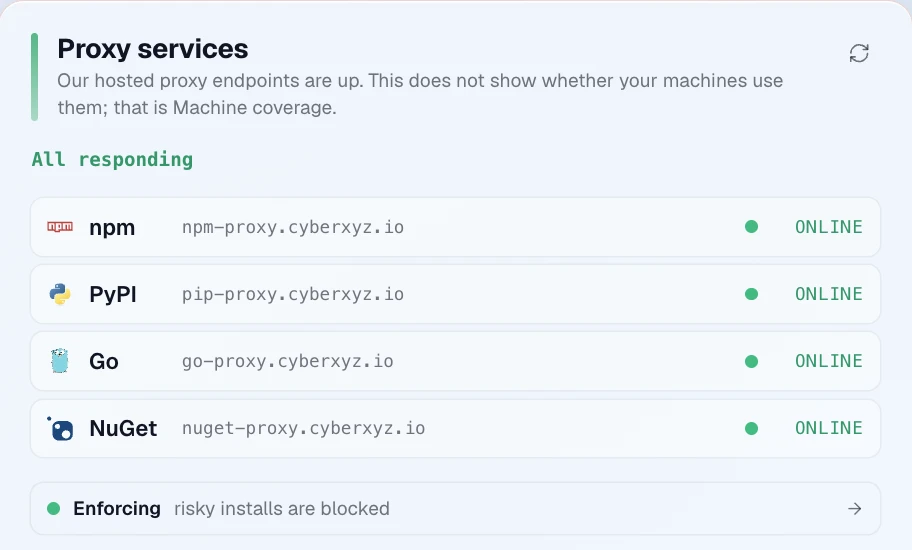
One setup step on each laptop, server and CI pipeline points npm, pip, Go and NuGet at CyberXYZ Proxy. After that nothing changes: the same projects, the same files, the same pipelines. AI coding agents on those machines are covered too.
On a laptopAcross a fleet (MDM)$ xyz proxy setupIn CI$ sudo xyz proxy setup --system$ eval "$(xyz ci protect)"- Install xyz Scanner with pipx install cyberxyz-scanner, then run xyz login.
- On GitHub Actions, use CyberXYZSecurity/depalert-action@v1.
- Covers npm, pnpm, yarn, bun, pip, uv, Go and NuGet.
 The same on
-
2
Analyze
CyberXYZ analyzes every package before it lands: its code, the new dependencies it brings and its release history. If it finds malware, the install stops.
axios@1.14.1BLOCK- why
- A hijacked maintainer account added plain-crypto-js, a brand-new dependency that installs a remote-access trojan
Six checks on every install; three fired for axios@1.14.1
New dependency Odd version jump (fired) Known malware (fired) Security advisory (fired) Commit-level review Vendor breach- ALLOW
- The install goes ahead and is logged.
- ALERT
- The install goes ahead. The reason shows in your dashboard.
- QUARANTINE
- Stopped and held for review: early warning signs, no advisory yet.
- BLOCK
- Refused: a known malicious version, a critical advisory, or your org's block list.
-
3
Your team hears about it
Safe packages install normally. Blocked ones never reach the machine, and the reason shows up where your team already works: the dashboard, the pipeline, the editor and the terminal.
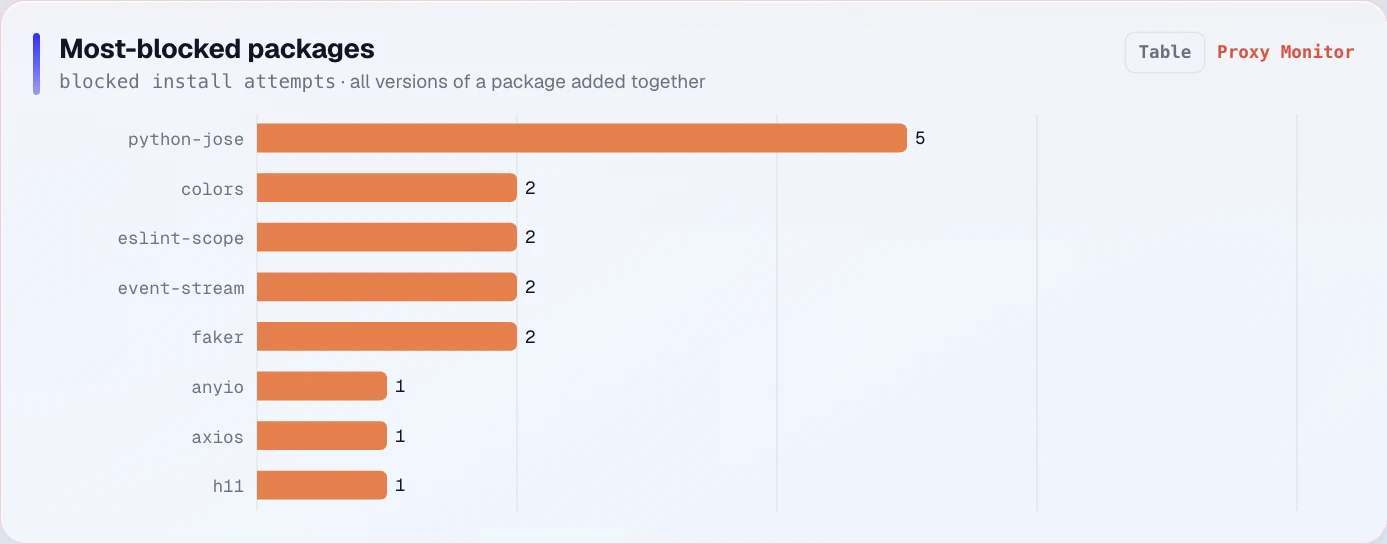 BLOCKInstall blockedpackageaxios 1.14.1 wherea CI/CD pipeline
Where your team sees it
- Dashboard
- GitHub Actions
- GitLab CI
- Azure DevOps
 VS Code
- Your terminal
1 package becomes 66
You ask for one package. You get dozens.
Adding express, one of the most popular web frameworks, quietly brings in 65 more packages. Any one of them can be hijacked, and the malware arrives with the package you chose.
Fresh install of express 5.2.1 on 7 Oct 2026. npm reports "added 68 packages" because it installs one of the 66 in three places. Maintainer accounts from the npm registry.
npm · 7 Oct 2026Your project asks for one package.
"express": "^5.2.1"
express 5.2.1ALLOWyou chose this
The same whether a laptop or a CI runner installs it.
It quietly brings in 65 more.
ALLOW today: 64ALERT today: 1 (router 2.2.0, a new dependency in this release)
maintained by 34 npm accounts outside your company · up to 6 levels deep
One of them went bad.
A fresh express install that day could pull it in. npm pulled it later that day, and this time the malware only attacked browsers.
Today express installs debug 4.4.3: ALLOW.
We don't theorize about attacks.
We catch them.
Real campaigns, each written up in full: the timeline, when we acted compared with the public disclosures, and what we changed afterwards, including where we were late.
PyPI · 11 Sep 2026 · times in UTCFake AI libraries on PyPI
openaii, langgrap, ollamaa and transfomers: copies of openai, langgraph, ollama and transformers that hid code which runs every time Python starts.
- published to PyPI
- CyberXYZ finds the hidden startup hook
- blocked at the proxy BLOCK
- public advisory (OSV)
More attacks we caught before the advisory
dotenv-asyncnpm · 30 Sep 2026A fake dotenv library. Flagged as malware 2 h 57 min after it was published.
Hades, the Shai-Hulud worm on PyPIPyPI · 5 Jun 2026In-app HIGH alerts about 30 minutes after the wave began. The first blocks followed on June 10.
Selected cases, not the norm: most malicious releases reach CyberXYZ through public advisories, and the proxy blocks them once they are listed. Times come from CyberXYZ block and alert records and the OSV API, checked 7 Oct 2026. Advisory-based tools need at least until the advisory, plus their own update time.
npm · write-updotenv-asyncA dotenv lookalike that pulls PowerShell out of a JPEG and runs a Windows second stage. We flagged it 3 hours after it was published.4 days before the advisory
PyPI · write-upHades PyPI wormA .pth startup hook runs a Bun-based credential stealer. Our first in-app alert came about 30 minutes after the wave began, hours before the first public advisory.38 PyPI packages · 68 versions
npm · case studyMini Shai-Hulud wormOne stolen npm token poisoned the AntV namespace in 27 minutes. We blocked it after Endor Labs' disclosure.323 packages · 639 versions
 AI models · case studypyannote and lightningEight AI models name a clean package. One hop below sat a checkpoint-loading RCE, fixed Sep 10, 2026.CVE-2026-58659
npm · case study@immobiliarelabs MiasmaHid execution in binding.gyp and slipped past lifecycle-script scanners, ours included. Now blocked as a class.binding.gyp evasion
npm · case studyaxios 1.14.1 RAT dropperA hijacked maintainer account slipped a remote-access trojan into a brand-new dependency. Every install of it is blocked today.plain-crypto-js 4.2.1
AI models · case studypyannote and lightningEight AI models name a clean package. One hop below sat a checkpoint-loading RCE, fixed Sep 10, 2026.CVE-2026-58659
npm · case study@immobiliarelabs MiasmaHid execution in binding.gyp and slipped past lifecycle-script scanners, ours included. Now blocked as a class.binding.gyp evasion
npm · case studyaxios 1.14.1 RAT dropperA hijacked maintainer account slipped a remote-access trojan into a brand-new dependency. Every install of it is blocked today.plain-crypto-js 4.2.1
Look up any package before you install it.
Every npm, PyPI, Go and NuGet package and every Hugging Face model we track has a public report: the verdict our install proxy gives, the advisories, the signals and a safe version. Free, no sign-in.
Browse every package and AI model report- npmBLOCK 1.14.1axiosA hijacked release that dropped a remote-access trojan. Use 1.20.0.Report
- npmBLOCK 6.6.6fakerSabotaged by its own maintainer (GHSA-5w9c-rv96-fr7g). Use 5.5.3.Report
- PyPIBLOCK 1.4.1durabletaskA known malicious release on PyPI. Use 1.5.0.Report
- PyPIALERT 2.6.5lightningAn advisory (GHSA-qqmf-gpg7-g8gw) that 2.6.6 fixes.Report
- npmALLOW 4.21.2expressPasses every check. Its dependencies are in the report too.Report
 AI modelLOAD SAFETYall-MiniLM-L6-v2Which weight files are safe to load, file by file, before you load them.Report
We read the code,
not just the scorecard.
Most supply-chain tools rate a package on project-health signals. CyberXYZ does that and reads the code itself. For widely used packages it also reads the commits behind each release, so a malicious hook can be caught in the change, not only after an advisory exists.
One firewall.
Everywhere code gets installed.
CyberXYZ Proxy
Sits between your machines and the registries. Every install is checked, and a bad package gets a hard block.
How the proxy works
CyberXYZ Gate
One line in CI. A malicious dependency fails the build before it ever merges.
Add it to CI
xyz for VS Code
Risky dependencies are underlined as you type, with the full verdict one hover away.
The extension
xyz Scanner
Audit any project and fix what it finds, from your terminal, across npm, PyPI, Go and NuGet.
xyz Scanner
AI models
Checks Hugging Face models and every package they pull in, without ever running the model's code.
Why models need it
CyberXYZ Dashboard
Every install decision, by machine and pipeline, in one place your security team can review.
The dashboardBuilt for security teams, by one.
I worked closely with CyberXYZ’s install-time supply-chain firewall, and it addresses this problem at the right layer. The proxy sits between an organization’s machines and the public registries, so every npm, PyPI, Go, and NuGet install, whether initiated by a developer, a CI/CD pipeline, or an AI coding agent, is evaluated before it lands.
For any organization building with open source and AI, CyberXYZ delivers preventive, practical supply chain security.

 SichGate
AthenaGuard relied on CyberXYZ to secure our entire stack. Between their comprehensive scanners, VS Code extension, and MCP server, they seamlessly handle our vulnerabilities, SAST, supply chain security, and AI models. It gives our engineering team total peace of mind and lets us ship fast without ever compromising on security.

 AthenaGuard
I really liked the product, and that you’re ahead of the market: commit and PR-level review that catches zero-days before a CVE. We invited the team to present to our incident response and offensive security groups.

CyberXYZ’s suite of security solutions including its scanner, proxy, gateway, and risk-scoring methodology addresses the emerging security challenges introduced by AI-driven software development. Organizations leveraging AI in their software development life-cycle face a rapidly evolving threat landscape, and CyberXYZ provides the protection necessary to mitigate these risks.
 lululemon

 // where it startedDefended as a master’s thesis. The detection method was developed at Cork Institute of Technology, now MTU, and became the engine that runs today.Read the paper
Evidence for your SOC 2 audit, as a side effect.
Every install decision is logged: the package, the machine, the verdict and the reason. That record supports the system-monitoring (CC7.1) and change-management (CC8.1) controls your auditor tests.
- Every install logged, allowed or blocked
- The machine and the reason on every entry
- Malicious packages never reach the machine
Questions your platform team will ask.
Straight answers from how the product works today.
What happens if CyberXYZ goes down?
If the proxy can’t reach CyberXYZ, it reuses any verdict it already reached for that exact package version in the last 24 hours. Otherwise your organization’s setting decides. By default the install is refused with a “retry in a minute” message. Admins can choose to let unchecked installs through instead.
What do you record about each install?
Each install is logged under your organization with the package, version, verdict and reasons, plus the machine, IP address and package manager. Package files are never uploaded to the CyberXYZ API. Downloads do pass through our hosted proxy on their way from the public registry. If someone asks for a package name the public registry doesn’t have, we keep that name, with the machine that asked, for 90 days after the last request, because missing names are how slopsquatting starts. If someone later registers that name and it becomes an open slopsquatting finding, we keep the record as evidence for up to a year.
Can we set our own rules?
Yes. Org admins can block packages for the whole organization or for single machines, with an optional expiry, and choose the enforcement level and what happens during an outage. Every change goes into your organization’s audit log.
Which machines and pipelines does it support?
macOS, Linux and Windows. Your MDM can enroll a whole fleet with one setup command and your organization’s enrollment token. Pipelines run on GitHub Actions, GitLab CI, Azure DevOps and any other CI that runs a shell.
How do we take it off a machine?
Run xyz proxy remove, or sudo xyz proxy remove on managed machines. It puts each package manager back on its default registry and removes the background agent.
Do we need a credit card to try it?
No. You sign up with your work email and your organization’s name. Each sign-up gets its own private workspace, with you as its admin.
Watch it block a real attack. Then run it on your own installs.
Book 15 minutes. We run real packages through CyberXYZ while you watch, including axios 1.14.1, a hijacked release that dropped remote-control malware in March 2026, and show you exactly what your team would see. Then we connect one laptop or one pipeline for a 30-day proof of value.
What happens next
- 01A 15-minute callReal packages, real verdicts, and your questions.
- 02Connect one laptop or one pipelineOne setup command, or one line in CI. Under an hour.
- 03A 30-day proof of value on your own installsEvery signal, no card.
Not ready for a call?
Check any package, free, and see the verdict we would give it.
Thanks! We'll be in touch.
Check your inbox. We'll reach out within 24 hours.